
BlockIP2 version 3.00
This page is dedicated to BlockIP2, and other security exit stuff
News: BlockIP2 version 3.0x has been tested with MQ version 9.1.0.0, 8.0.0, 7.1 and 7.0.1 on z/OS version 1.11, 1.13, 2.1, 2.2 and 2.3 and various other systems without problems.
Important Notice:
The suggestions on this site is free and without any guarantee of any kind. The intension of this page is to help WebSphere MQ system administrators managing their sites, and reduce the frustration reading the manuals and repeat the trouble I've gone thru.
BlockIP2
BlockIP2 is a IBM MQ channel security exit. It's designed to help you keeping your WebSphere MQ environment safe. And it's free.
The manual for BlockIP2 is here
Download BlockIP2 version 3.00 (source and DLL for Windows 2003/2008 included together with a load-module for Linux-Intel (32+64 bit versions)) and object code for z/OS ready for linkage or load module ready for use.
Download BlockIP2 version 2.93 (source and DLL for Windows XP/2003 included together with a load-module for Linux-Intel (32+64 bit versions), Solaris and AIX) and object code for z/OS ready for linkage or load module ready for use.
Download BlockIP2 version 2.78 (source and DLL for Windows XP/2003 included together with a load-module for Linux-Intel (32+64 bit versions), Solaris and AIX) and object code for z/OS ready for linkage or load module ready for use.
Download BlockIP2 version 2.69 Just for backup.
Download BlockIP2 version 2.66 Just for backup.
Download BlockIP2 version 2.64 Just for backup.
Download BlockIP2 version 2.60 Solaris SPARC binaries only ready to install, Build on Sun Solaris 5.9 sparc 64bit.
Download BlockIP2 version 2.55 (source and DLL for Windows NT/2000 included together with a load-module for Linux-Intel (32+64 bit versions), Solaris x86 and AIX).
Download BlockIP2 version 2.48 (source and DLL for Windows NT/2000 included together with a load-module for Linux-Intel (32+64 bit versions), Solaris x86 and AIX).
Download BlockIP2 version 2.44 (source and DLL for Windows NT/2000 included together with a load-module for Linux-Intel (32+64 bit versions), Solaris x86 and AIX).
The BlockIP2 2.40 exit have been tested on Windows 2000, Windows XP, AIX, LINUX and z/OS. But you have to compile it on z/OS, Solaris and HP-UX by yourself.
BlockIP2 2.46 have been tested on WebSphere MQ version 5.3, 5.3.1 and 6.0.1.0
We're starting to add support for AS/400 (iSeries) to help users on this fabulous platform.
Old versions and more descriptions
Download BlockIP2 version 2 (2.15) (source and DLL for Windows NT/2000 included together with a load-module for Linux-Intel)
The BlockIP2 exit have been tested on Windows 2000, z/OS, HP-UX and LINUX. But you have to compile it on Solaris and AIX by yourself. And is currently under test on AIX/Solaris.
BlockIP2 have been tested on WebSphere MQ version 5.2, 5.3 and 5.3.1.
Version 2.12-2.13 enhancement
You can place the log file as you like, just specify the wanted path in the configuration file. You can even have a log file per channel per day, this means that it's easy to monitor the channel usage.
There have been added two more functions to ease the specification of filter characteristics: UseridUpperLowerCase=* and BlockUsers=;
These two will ease the specification so you can "blacklist" a few of the generic Userids=.
Version 2.15 enhancement
Thanks to Neil Casey who have ported the BlockIP2 exit to the z/OS platform, this have made it possible to have one exit source that is able to run on mostly all supported MQ platforms, and therefore is able to offer the same security strength.
There is a short implementation description in the readMe file on how to implement the exit on z/OS.
The compilation specs. for HP-UX is also added.
Extended maximum pattern lengths to 256 characters. Changed logic for building the pattern strings so the multiple Pattern= or User= etc lines add to the previously built string, instead of overwriting it. This is a function change which makes this version behave differently when faced with multiple lines of data which previously just used the last data found.
Version 2.18-2.20 enhancements
Support for WebSphere MQ version 6.0 added, and logic added to control the number of connected channels added. This should help to keep your WebSphere MQ environment stable and secure. Currently not supported on z/OS.
Version 2.21-2.22 enhancements
Added support for better granularity in specifying patterns for validations of userids, connection-names. It's now possible to select a range of values like user=$$##### (saying that the userid have to start with two alphabetic characters followed by five digits. On connection_name 10.2[2-5].1.10, which will allow connections from 10.22.1.10, 10.23.1.10, 10.24.1.10, 10.25.1.10. A security problem was also solved.
The default of blocking blank userids has been added to enforce strengthened security, If you want to allow connection using a blank userid you have to specify: AllowBlankUserID=Y; in the configuration file or +b; in SCYDATA. There are added code for future implementation of user authentication from a ClientExit, on the supported platforms.
Download BlockIP2 version 2.22
Version 2.32 enhancements
Functionality to control/limit the number of running channels on the same time. Some reentrant code enhancements made, and some error corrections.
Download BlockIP2 version 2.32
Version 2.33-2.40 enhancements
Ported to support 64 bit architecture, and shared memory table to gain performance on channel limitation.
Initial support for AS/400, this support is still in Beta mode.
Unix shared memory failure fixed.
Download BlockIP2 version 2.40
Version 2.40-2.44 enhancements
Storage leak fixed in Windows, this was caused by some compiler options. Shared memory support added for Windows to reduce CPU consumption using the channel limiter.
Download BlockIP2 version 2.44
Version 2.48-2.55 enhancements
Storage leak fixed in z/os. Implementation of DNS lookup of hostnames, and IPv6 readiness. Some support modules are only available as object modules.
Download BlockIP2 version 2.55
Version 2.56-2.60 enhancements
SSL problem solved and reinstated quite mode. Default init file added BlockIP2.ini, with support for multi queue managers and multi channels in the same configuration file.
Download BlockIP2 version 2.60
Version 2.62-2.64 enhancements
More SSL problems solved and more filtering criteria's added.
Download BlockIP2 version 2.64
Version 2.66 enhancements
Extract MCAUSER from SSL DN. Problems with BlockIP2.ini and channel limiter solved.
Download BlockIP2 version 2.66
Version 2.67-2.69 enhancements
Problems with FN= and missing files solevd. OS/400 support is now documented and working. Sporadic storage problems causing SIGSEGV solved.
Download BlockIP2 version 2.69
Version 2.70-2.78 enhancements
Minor changes and new options. Rename WTO message prefix for z/OS. Change type logging type for some UNIX implementations.
The z/OS Channel limitter responds now to changes after they are read from configuration file, this means that you now can change the settings later on
Download BlockIP2 version 2.78
Version 2.79-2.93 enhancements
Support for Multi Instance queue managers added togeter with many smaller enhancements and removed the root to various crashes
Download BlockIP2 version 2.93
History of changes on BlockIP2
BlockIP2 and firewalls
How do I configure BlockIP to handle communication using firewalls ?
It's just as anything else, there are no problems in this area, just use the converted (NATed) address supplied by you network administrator ;o)
I have a configuration like this using two Queue Managers (QM1 and QM2) located in their own LAN, protected with Firewalls which can do NAT.
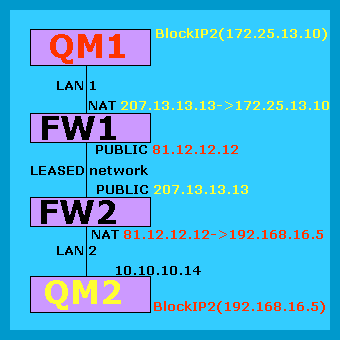
When I see QM1 from FW2 (marked with red), all I see is the public network address of FW1, in this case 81.12.12.12 ! I don't see the internal addresses inside LAN-1, they are hidden! Therefore I can only translate public address (If i need/like to), in my case I need to change it to a "local" address 192.168.16.5. This means that communication to and from QM1 in LAN-2 is done using 192.168.16.5, this means that BlockIP2 should only allow 192.168.16.5.
How I typically start configure BlockIP2 for a new network connection, is using either * (all allowed), or just block anybody, and study the log to find the wanted address. This is normally only necessary if your network specialist is unable to tell you how the incoming network is mapped....
Anyway your network specialist have to supply you with the address towards QM1....